
If your WordPress website runs Google Analytics 4 (GA4), Google Ads, or Google Marketing Platform, supporting Google Consent Mode v2 is mandatory under the European Union Digital Markets Act (DMA). Without proper consent signals, your Google Ads remarketing lists, conversion modeling, and audience measurement will fail to track European users. GDPR Consent Pro for WordPress provides complete, native support for Google Consent Mode v2 with zero cloud latency and no monthly subscriptions.
Implement Google Consent Mode v2 in 5 Minutes
Protect your ad conversion tracking and GA4 analytics while maintaining strict GDPR compliance. Works out of the box with Google Tag Manager and direct gtag.js setups.
Why Google Consent Mode v2 is Strictly Required
Under the EU Digital Markets Act (DMA), Google acts as a designated gatekeeper. To ensure advertisers do not harvest European consumer data unlawfully, Google requires that all web traffic passing into Google Ads and GA4 passes four specific consent parameters:
ad_storage: Controls cookies used for advertising purposes.ad_user_data: Governs sending user data to Google for advertising.ad_personalization: Governs personalized advertising and remarketing.analytics_storage: Controls cookies used for traffic measurement and analytics.
When a visitor first arrives at your website, Google Consent Mode sets these parameters to denied by default. As soon as the visitor interacts with your GDPR Consent Pro banner, the plugin immediately fires the update signal (gtag('consent', 'update', {...})) to grant or deny individual permissions according to user choice.
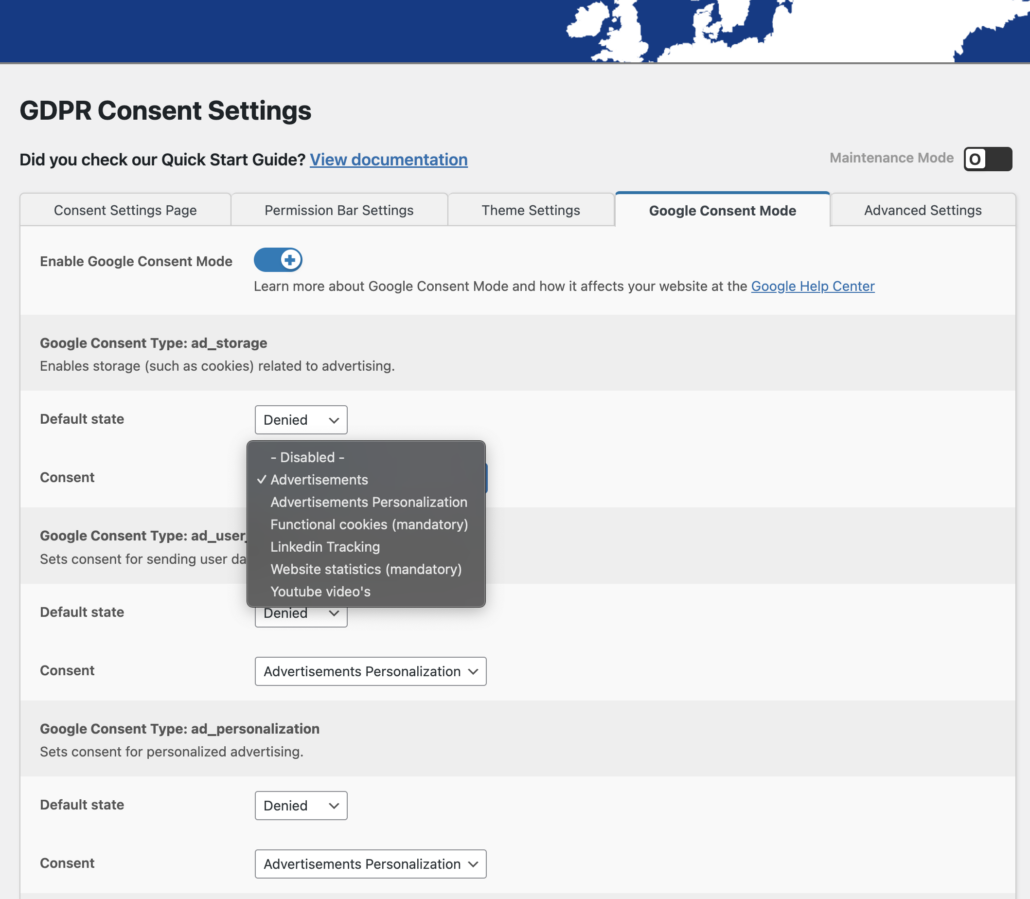
How GDPR Consent Pro Implements Consent Mode v2
Unlike complex enterprise CMPs that require external JavaScript tags that degrade your PageSpeed score, GDPR Consent Pro embeds the consent mode snippet directly into the WordPress wp_head hook before any Google tags execute:
- Default Denial on Initial Pageview: Ensures zero tracking cookies are written before visitor consent.
- Instant Dynamic Update: Updates
dataLayerand firesgtag('consent', 'update')the millisecond the user accepts or rejects cookies. - Cookie Category Mapping: Easily map your Marketing, Analytics, and Functional cookies directly to Google’s consent types in the WordPress admin panel.
- Google Tag Assistant Verified: Passes Tag Assistant validation with full green checkmarks on both Basic and Advanced implementations.
For a complete step-by-step walkthrough of configuring Google Tag Manager and GA4, read our Comprehensive Google Consent Mode v2 WordPress Guide.
Frequently Asked Questions (FAQ)
Do I lose conversion tracking in Google Ads without Consent Mode v2?
Yes. Google blocks European conversion measurement and audience remarketing in Google Ads if the ad_user_data and ad_personalization signals are absent from incoming tag hits.
Does GDPR Consent Pro support Google Tag Manager (GTM)?
Yes. GDPR Consent Pro pushes standard consent events to the GTM dataLayer, allowing your GTM tags to fire automatically based on built-in consent checks.
Is there any monthly fee based on website pageviews?
No. Unlike SaaS consent banners (e.g., Cookiebot) that charge monthly fees that scale with your traffic, GDPR Consent Pro is a flat €49/year regardless of your visitor volume.
How do I verify that Consent Mode v2 is functioning properly?
Use Google Tag Assistant (tagassistant.google.com). Under the “Consent” tab for each tag, you can verify that the default state is denied and that an ‘Update’ event fires immediately when consent is granted.